The price of a single memory card can vary three- or fourfold within the same capacity. A 64GB SD card sells for under twenty dollars in one model and over a hundred in another. To judge whether the more expensive card earns its price — or whether you are getting pulled by marketing — you need to know what the small numbers on the surface actually promise.
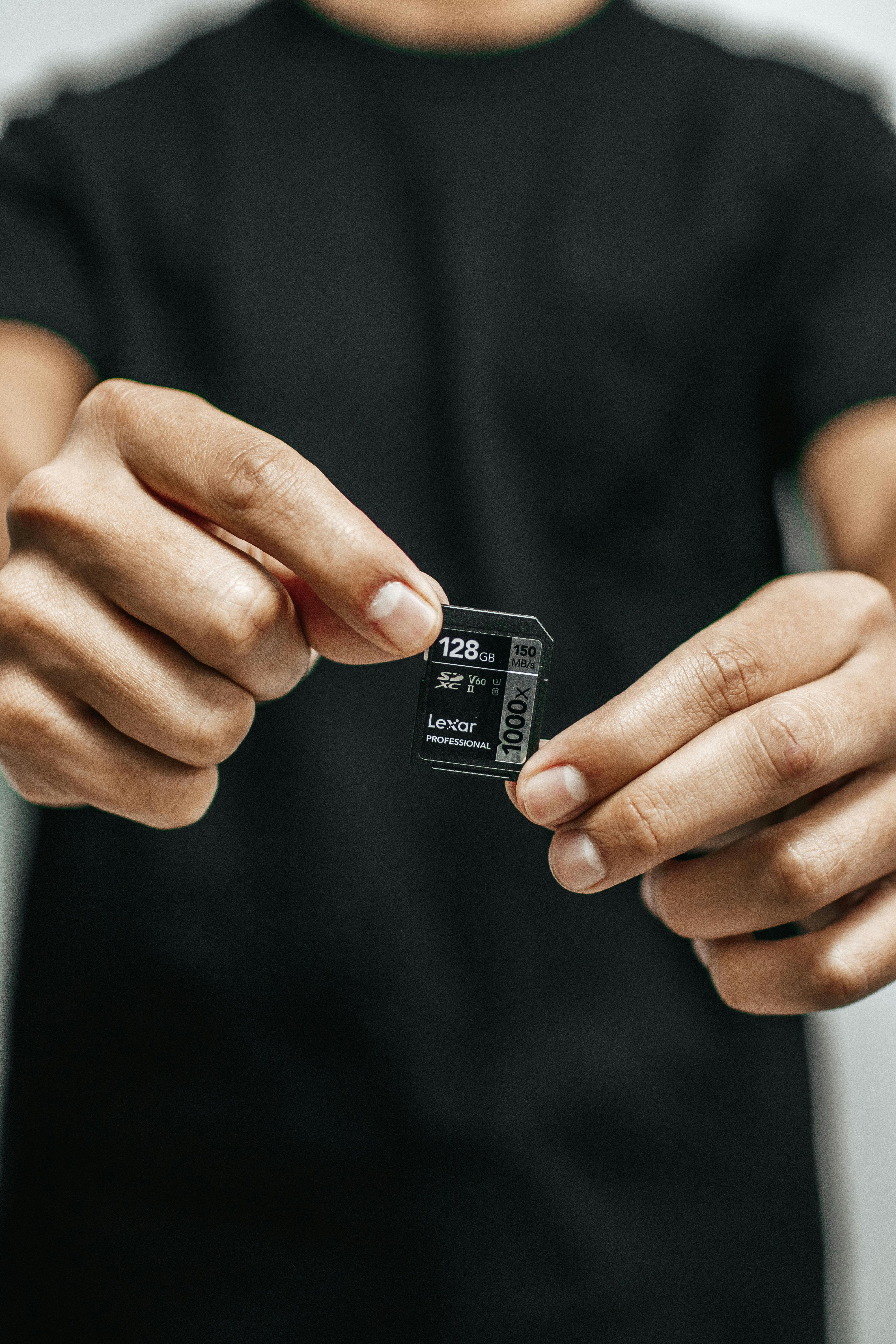
SD card markings stack three systems
On the surface of an SD card, three different speed ratings are usually printed together. First is the class, the number ten inside a circle. It guarantees minimum write speed of 10MB per second. Second is the UHS rating, a 1 or 3 inside a U. U1 guarantees a minimum of 10MB/s; U3 guarantees a minimum of 30MB/s. Third is the video speed class, numbers prefixed with V. V30 guarantees a minimum of 30MB/s; V60 guarantees 60; V90 guarantees 90. All of these are minimum sustained write speeds, which is the point.
That means a number like “150MB/s” in large print on the card face is maximum read speed, not write. For shooting, what matters is write speed — specifically minimum write speed. Recording 4K 60p at 100Mbps requires 12.5MB per second continuously. V30 guarantees a 30MB/s floor, which leaves room. Push to 8K or 12-bit RAW video and the requirement climbs past 200MB/s, demanding V60 or V90.
CFexpress is a different league
The latest high-end mirrorless cameras carry CFexpress slots. CFexpress is PCIe-based and runs at speeds SD cannot match. Type B reaches up to 1.7GB/s read and 1.4GB/s write. Used for 8K RAW video and 30-plus frame-per-second RAW bursts at full sensor resolution. The price is five to ten times that of SD. It is not a card everyone needs.
Within CFexpress, Type A and Type B are different cards. Some Sony bodies take Type A; high-end Canon and Nikon bodies use Type B. The physical dimensions differ; they are not interchangeable. When buying, the first thing to confirm is which type your body accepts. For the broader picture of how card formats have evolved across SD and CFexpress, this memory card buying guide walks through every marking on a card face one by one.
Burst buffer and card speed
Take RAW at ten frames per second. If one RAW file is 30MB, the camera buffer fills at 300MB per second. If the card writes at 100MB/s, the buffer accumulates 200MB per second of backlog and eventually the burst stops. With the card at 300MB/s or better, the burst continues almost indefinitely. In sports and other decisive-moment work, card write speed effectively defines the buffer.
Dual slots and how to use them
In bodies with two card slots, how you configure them shapes the workflow. First: backup recording. Same file written to both cards; if one fails, the other survives. Standard for weddings and one-off events. Second: split recording. RAW to one card, JPEG to the other. Lets you process previews and deliveries quickly while keeping master files separate. Third: stills and video split. One card for photos, one for video. Generally safer to put video on the faster slot.
The two slots often run at different speeds. One slot is full UHS-II while the other accepts only UHS-I. With backup recording enabled and one card UHS-I, the backup rate drops to the slower card’s pace. Bursts slow down for that reason, and it is a common source of confusion. The flow alongside fast subjects and the card limits they hit is also touched on in the action and motion section. AF and burst mechanics can be perfectly tuned and still lose the second decisive frame if the card cannot keep up.
Card lifespan and reliability
SD cards are not infinite. Flash memory cells have a write-cycle limit, and cards are designed to survive somewhere between tens and hundreds of thousands of write cycles. In normal use, users tend to lose or break their cards before reaching the limit. Video work, with its repeated writes to the same region, accelerates the count.
The practical lesson is to buy from reputable brands and rotate cards over time. The same card used heavily for five years can suddenly fail to read one day. Cycling new cards in and pushing older ones to backup or travel use is a safer rhythm. Routing every important shoot through a single card is the single most dangerous habit.
Counterfeits and verification
Cards sold online at suspiciously low prices are often counterfeit. The exterior matches the real product, but actual capacity is smaller than printed or speeds drop far below spec. A counterfeit card overwrites earlier files once it passes its true capacity. The most reliable check is to buy from the manufacturer’s official distribution. The extra hassle is worth it; lost data does not come back.
Small daily rules
Before removing a card from the camera, confirm the last write has finished. The activity LED blinking means the card is still working; do not pull it. When moving data to a computer afterward, a card reader is more reliable than USB through the camera. Once data is on the computer, do not delete files from the card until the backup is verified. After the backup completes, format the card in the camera itself. Use the camera’s format rather than deleting from a computer because the card’s file system is matched to the camera firmware. Deleting from a computer can leave file system metadata behind that occasionally confuses the camera into a recognition error.
Keep a small case for card storage. Cards rolling loose in a bag pick up dust on the contacts and bend the pins. A simple case with one slot per card lets you see at a glance which cards are backed up and which still hold live data. Small habit, but everyone who has lost a card builds one.
Replacing the vague intuition that faster cards are always better with a clear sense of what your work actually requires makes card choice straightforward. V90 is not overkill for someone shooting 4K 60p; CFexpress is overkill for someone shooting JPEG snapshots. Cards sit closest to the camera among all the parts, but they are also the most frequently misjudged.
Thermal management on cards
Fast cards warm up. CFexpress in particular can reach surface temperatures that feel hot. Excessive heat triggers automatic throttling by the camera. The rated 1.4GB/s drops to under 600MB/s after five minutes of sustained video. Cards with better thermal design hold full speed longer. Heat sinks fused to the card surface, aluminum cases instead of plastic, and similar design choices matter for sustained workloads. For long video sessions, check whether the card has external thermal aids.
One workaround in hot conditions is rotating two cards. Swap cards between takes; let one cool while the other writes. Inconvenient but it keeps speeds consistent. In video, one card’s heat can affect the next take’s quality directly, so this small habit gives a real return.
One final emphasis is to treat cards as part of the work itself. People who handle their cameras and lenses with great care still toss their cards around. Recalling that one card holds the result of a month’s work changes the weight. A small object holds every outcome you made. That is why cards deserve the most deliberate choice and the most deliberate handling among all the parts.
The cost of a single card can look high, but the cost of one data loss is much higher. Lose a wedding’s photos and the cost is a refund and a reshoot, and the trust does not fully come back. People who have been there call good cards insurance. A small price difference per card eventually translates into thousands of dollars of risk reduction. By that math, cards are one of the best returns on investment in a kit.